
Tap OUT, say what happened and carry on.
Short answer
Tap OUT, choose the dismissal, add the details the app asks for and tap Record wicket.
Record the dismissal
- Tap OUT.
- Choose how the batter was out.
- For a run out or obstruction, choose which batter is out.
- In a match with player names, choose the fielder for a catch, stumping or run out.
- Set any runs completed, then tap Record wicket.
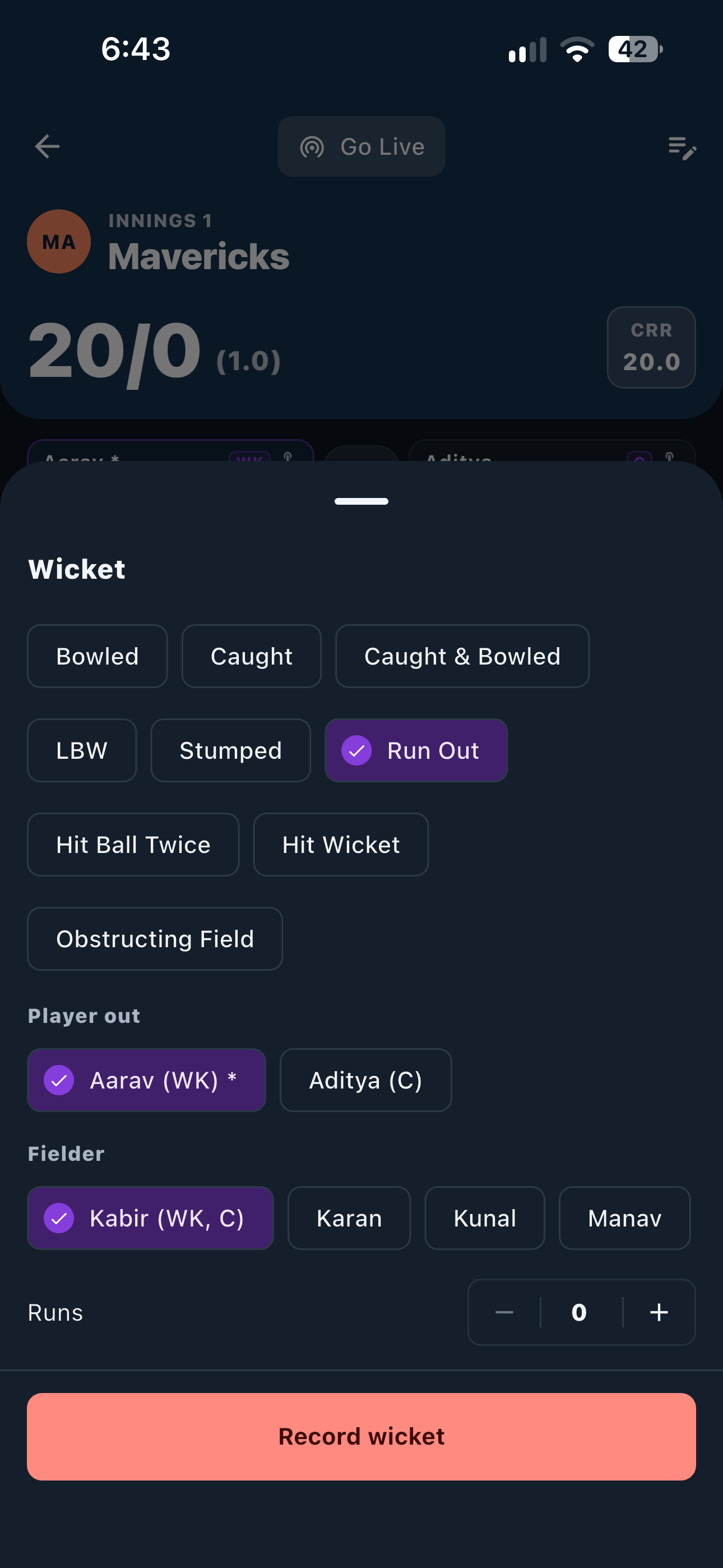
Dismissals you can record
To learn what each wicket type means, see all the ways of getting out.
| Dismissal | Note |
|---|---|
| Bowled, caught, caught and bowled, LBW | Credited to the bowler |
| Stumped, hit wicket | Credited to the bowler |
| Run out | Not credited to the bowler. Choose which batter and the runs completed |
| Obstructing the field, hit the ball twice | Not credited to the bowler |
| Timed out, retired out | From batter actions in matches with player names |
Next batter
With player names on, the app asks you to choose the next batter before scoring continues. In a quick match it carries on with the placeholder batters.
Wickets on a free hit
During a free hit the app only offers run out, hit the ball twice and obstructing the field.
Frequently asked questions
How do I undo a wicket?
Tap Undo. The ball and the wicket are removed together.
How do I record a stumping off a wide?
Press and hold WD, then choose stumped.